Design of this house enquires wrapping of a strip of programs around a central courtyard. I guess the side effects of this method is that it causes a fortress-like building whereby the entired spatial experience is internalised.
Showing posts with label my digitalJUNKYARD. Show all posts
Tuesday, November 24, 2009
Casa Lim #2
Design of this house enquires wrapping of a strip of programs around a central courtyard. I guess the side effects of this method is that it causes a fortress-like building whereby the entired spatial experience is internalised.Sunday, November 22, 2009
MentalRay Settings
Download scene file here.
1. F10 to get into render setup and select MentalrayDaylighting High. Just click 'OK' if it ask for anything.
2. Enable Final Gather > choose your preset... low, medium, high
3. If you got a workstation, go for global illumination. Great fr interiors. If not, doesn't matter. I didn't select this option due to the long ass rendering time. ( which I can fix in Photoshop)
4. Check the options for memory management.
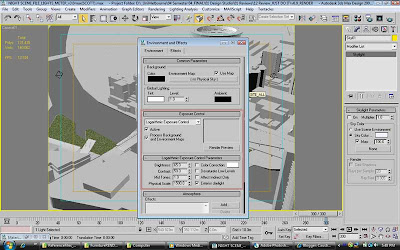
5. Close 'Render Setup' window and press '8' for Environment Control. In the ExposireControl, choose Logarithmic Exposure Control'.
6. Place direct light on target object and use the settings below.
8. Go to Render Setup again (F10), Common Parameters tab > Area to Render > select 'Crop'.

9. Right click the 'Camera' or 'name of vewport', and enable 'Show Safe Frame' and 'Edit Render Region'
10. You're done, press 'F9'
Okay it sucks... i know... that's where photoshop comes in handy
11. In photoshop, select Image > Levels, increase the brightness contrast input levels (the small little white arrow.

TA DAH~!!!~
1. F10 to get into render setup and select MentalrayDaylighting High. Just click 'OK' if it ask for anything.
2. Enable Final Gather > choose your preset... low, medium, high
3. If you got a workstation, go for global illumination. Great fr interiors. If not, doesn't matter. I didn't select this option due to the long ass rendering time. ( which I can fix in Photoshop)
4. Check the options for memory management.
5. Close 'Render Setup' window and press '8' for Environment Control. In the ExposireControl, choose Logarithmic Exposure Control'.
6. Place direct light on target object and use the settings below.
8. Go to Render Setup again (F10), Common Parameters tab > Area to Render > select 'Crop'.
9. Right click the 'Camera' or 'name of vewport', and enable 'Show Safe Frame' and 'Edit Render Region'
10. You're done, press 'F9'
Okay it sucks... i know... that's where photoshop comes in handy
11. In photoshop, select Image > Levels, increase the brightness contrast input levels (the small little white arrow.
TA DAH~!!!~
Go here, if you want some simple Vray settings.
by the way..
3s MAX 2010 default settings for mental has a quality similar to Vray.
Trip to... eerr.. where d ar?
Saturday, November 21, 2009
Monday, August 3, 2009
3D Voronoi Script Test

Software: 3ds MAX 9 SP2
Script: 3D Voronoi Cell by Garp 2008
Modeling Time: 3 mins
This test is inspired by materialsystems.org in their exploration on Voronoi Morphologies
The script creates a specified number of Voronoi cells from a Bounding Volume and Cell Centers. A few V_cells are deleted just for the sake of a more interesting visual appearance.
The final product has their local polygons 'inset' and deleted to create openings rather than a full solid mass. 'Shell' and 'Turbosmooth' modifier is applied also for a more realistic and interesting visual.
Sunday, July 5, 2009
another graphic attempt... mood board

The mood I'm trying to express here is about creating order in chaos.... using systems theory to generate a parametric structure for the growth of Melbourne CBD to 1 million population.
How do we suggest a kind of structured growth that within a certain constraint? What are our parameters? What should my city be made out of?
However, in the end, I think the graphic tells more of the initial attempt of a designer where he is still uncertain of what to do when he looked at the 'mess'....
damn... should get help from sid and nathu for this...
Saturday, July 4, 2009
another 3DSMAX render test on semi-outdoor lighting
Freelance Interior Rendering - Exhibition on David Lynch @ ACMI, Melbourne
Thursday, June 4, 2009
Freelance Interior Rendering - Eco-Centre
Monday, May 18, 2009
3dsMAX Crowding exercise_
This is actually an unsuccessfult attempt for me to generate form with the 3dsMAX 'crowd' dynamics. However, this is what I've learned:
1. The crowds are generated from delegates, behaviour is too limited to determine or predict any social behaviour. However, these behaviours can be tweaked via scripting, MAXscript. This may take weeks to months. So, I'm letting it go...
2. With the basic behaviours such as 'seek', 'wander', 'target', 'gravitation', 'repel' should be good enough for simple animation, but not so much as for "simulation".
The GIF file may not work properly due to Google Docs
Wednesday, April 15, 2009
Sunday, November 2, 2008
another photoshop experiment... lighten
Main Image:
Random scatter of a box within certain constraints set in 3ds MAX compound objects.

Rendered with Light Tracer
image above: the 'lighten' effect is used with a concrete as the background map and brightness and contrast is adjusted

hyphothesis:
1.'difference' effect gives a very interesting "revealing effect" or somethng that is emerging
2. Still can't think of any use for the 'darken' effect except as background images. Old t-shirts graphics?
Random scatter of a box within certain constraints set in 3ds MAX compound objects.

Rendered with Light Tracer
image above: the 'lighten' effect is used with a concrete as the background map and brightness and contrast is adjusted 
'Difference' effect with bricks.jpg as foreground image. Effect is mostly controlled by the 'fill = %' of the foreground image.
hyphothesis:
1.'difference' effect gives a very interesting "revealing effect" or somethng that is emerging
2. Still can't think of any use for the 'darken' effect except as background images. Old t-shirts graphics?
Subscribe to:
Posts (Atom)